![base_logo_transparent_background.png]](https://support.labl.it/hs-fs/hubfs/base_logo_transparent_background.png?height=50&name=base_logo_transparent_background.png)
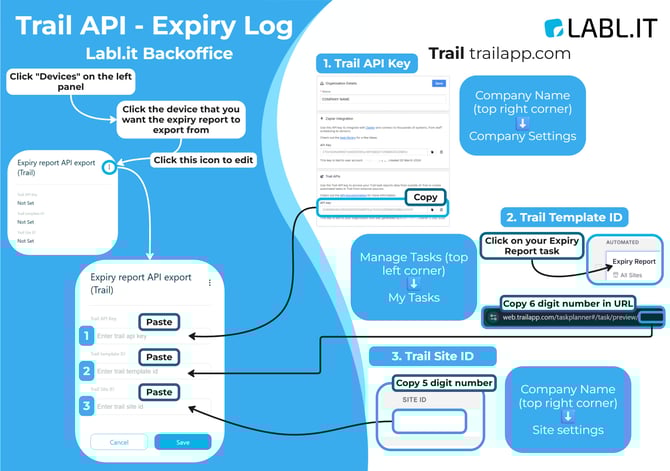
1. Get Your Trail API Key
- Log in to trailapp.com.
- Click your Company Name → Company Settings.
- Scroll to Trail APIs and click Copy next to the API Key.
2. Find Your Trail Template ID
- Go to Tasks → My Tasks.
- Open your Expiry Report task.
- Copy the 6-digit ID found in the URL of your web browser.
3. Get Your Trail Site ID
- Click your Company Name → Site Settings.
- Copy the 5-digit Site ID shown.
4. Enter Details in Labl.it Backoffice
- Open Labl.it Backoffice → Devices.
- Select the device used for expiry exporting.
- Open Expiry Report API Export (Trail) and click the ⋮ edit icon.
- Paste in:
- API Key
- Template ID
- Site ID
- API Key
- Click Save.
Your Trail integration is now active and Labl.it Backoffice will automatically pull your Expiry Report data.